A Best button, and the analyzer stops arguing with you
Diverging from a game is the part of the analyzer people actually use,
so this release is mostly about that. There is now a Best
button beside Undo: it takes back the move you just played and plays the
engine's choice in its place, in one tap. The best-move arrow is back on
the divergence board too, and it now disappears the moment you move
rather than lingering over the position you have just left.
Your move is no longer taken back. Playing a second
move while the first was still being analysed could make the first one
reappear when the analysis returned, undoing what you had done. A move
now supersedes whatever the engine was working on, and that analysis is
cancelled rather than left to finish.
Divergence moves have their own depth. A single move
you play yourself is something you sit and wait for, so it no longer
borrows the setting meant for analysing a whole game — which could mean
ten seconds for one move. Settings has a separate control for it, on the
device and in the cloud.
Captured pieces everywhere. The material taken by
each side is shown above and below the board on the front page as well,
so free play, an imported position and a scanned one all show the
balance. They are drawn with the board's own pieces now; the previous
symbols came from the system font, which drew the black set noticeably
larger than the white one.
News in the app. When there is something worth
telling you, it appears as a line on the front page that you can
dismiss. It stays dismissed.
Tidier analysis screen. The title and the back arrow
sit on the same line again.
1.19.1 – 1.19.4September 2026
Scanning a board from the other side
A position scanned from Black's point of view was read as though White
were at the bottom, which put every piece on the wrong square and made
the engine analyse a different position entirely — recommending, in one
report, a pawn capture that was not available. Flip board
on the checking screen now turns the coordinates round rather than just
the view: the pieces stay where they are and the bottom right corner
becomes a8. The position keeps that orientation when it loads, so the
board looks like the picture you scanned.
1.19.0September 2026
Share a game straight into the analyzer
Chess Analyzer now appears in Android's share sheet, so a game you are
looking at somewhere else can be handed over directly instead of copied
and pasted. Share a PGN and the import screen opens with it in place;
share a FEN and it is recognised as a position, side to move included;
share a screenshot of a board and it goes straight into scanning. It
works whether the app is already open or not, and nothing loads by
itself — shared text waits for you to tap Load, because share buttons
are easy to hit by accident. There is a
guide covering it.
Openings are graded as openings. Move
classification now consults a real opening book of roughly 7,800
positions rather than guessing from the evaluation. Theory is marked
as book and is no longer scored on how much material it appears to
concede, so a Scandinavian or a King's Gambit stops being reported as
a mistake. See
how moves are
classified.
A king can move into the corner again. In positions
where the king's only move was to a corner square, the board refused
it. That could leave a position with nothing playable at all.
Switching back from cloud analysis works. Turning
cloud analysis off and returning to on-device analysis could leave the
engine unable to start, showing a loading bar that never finished.
Analysis says what it is doing. A running analysis
used to look identical to a stuck one until the first move was scored.
It now shows that it has started, and gives up with a message instead
of waiting forever if the server cannot be reached.
More room for the board. The strip carrying the
players' names is half the height it was.
1.12.2August 2026
Analysis can run on a server now
The engine has always run on your own phone, and that puts a hard
ceiling on it. A phone analysing eighty positions has to be quick about
each one, and quick means shallow. Giving Stockfish four cores and a
couple of seconds per move instead of a fraction of one changes what it
finds — not marginally, but the difference between spotting a tactic
three moves out and spotting it seven.
So there is now a second option: Cloud analysis, which sends
the positions to a server that does the work and sends the evaluations
back. It is off by default, it asks before it is used for the first
time, and it currently appears only for accounts it has been switched on
for. If you are not one of them, nothing about this release looks
different, and the on-device engine is exactly as it was.
What goes over the wire is the list of board positions and the strength
you picked — not the PGN file, so player names, dates, results and any
comments in the game stay where they are. The positions are not kept once
the analysis finishes. The privacy policy
sets out the whole of it.
If the server cannot be reached, the phone quietly finishes the job
itself and tells you it did. An analysis does not fail because a
machine somewhere was busy.
Also in this release
Deleting your account clears more. Cloud analysis
keeps a record of how much engine time an account used. Deleting your
account now removes that too, rather than leaving it behind.
Privacy policy and terms rewritten. Both used to say
that analysis never left your device. That is still the default, but it
is no longer the whole story, and the pages now say so.
1.11.4August 2026
The opening you are in stays on screen
Analysis screens are mostly a long list of moves, and on a phone that
list is the thing you spend your time scrolling. The opening name used to
scroll with it — visible for a second at the top, then gone for the rest
of the game. That is backwards: the opening is context for whichever move
you are currently looking at, not a heading you read once and forget.
It now holds its position while the moves scroll underneath.
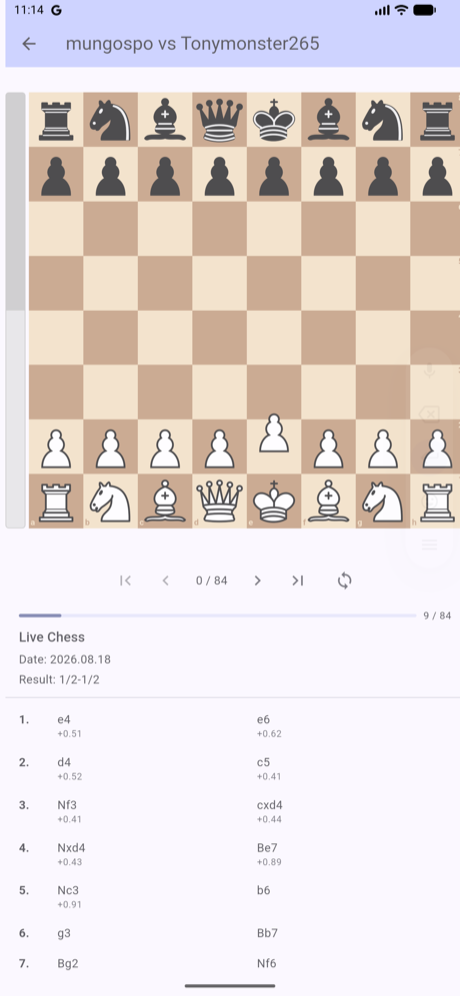
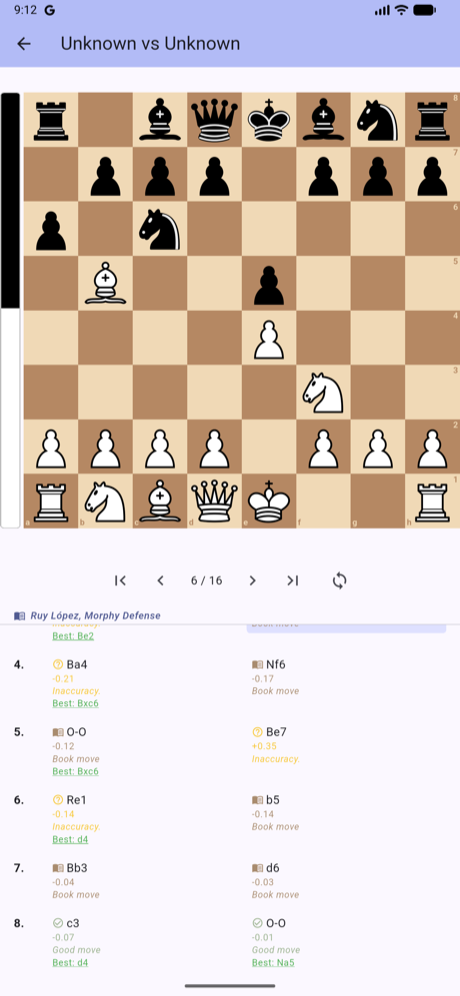
Before. Three lines of match metadata sat above the
moves, and the opening name scrolled away with the list.After. “Ruy López, Morphy Defense”
stays put; the list has scrolled beneath it.
The match metadata — event name, date, result — is gone from that panel.
It was three lines competing with the moves for the small amount of
vertical space a phone has, while telling you things you either already
knew or could see elsewhere: the players are still in the title bar, and
the result still appears after the final move.
Also in this release
Opening names in free play. Playing your own moves
from the starting position now names the opening as you go, and keeps
the last line you were in once you leave known theory.
A way back to these pages. The browser version has a
globe button in the title bar that returns you here, to the guides.
Both changes are in the browser version now, and reach the
Android app with the next release.